

Replicación de Base de Datos
 Agente Interconexión para el teletrabajo
  Audio Explicativo
 Folleto Explicativo
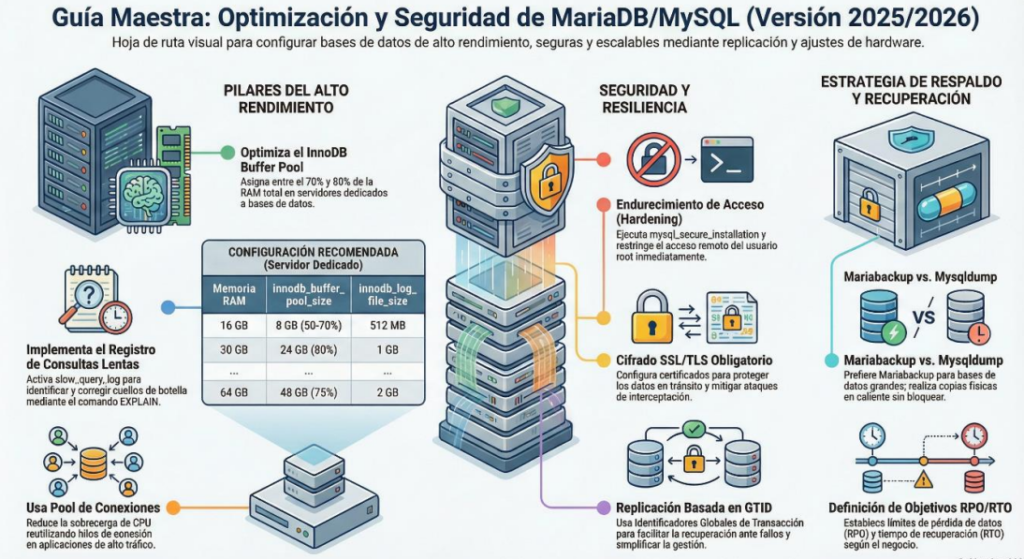
MariaDB Replication Architecture
A complete guide to deploying unidirectional Master-Slave replication on a Cloud VPS. Optimize read performance, ensure data redundancy, and manage remote synchronization.
Architecture Overview
The architecture consists of a single Master Node hosted on a Cloud VPS, handling all write operations. Multiple Slave/Client Nodes connect via a secure unidirectional stream to replicate data in real-time. This ensures high availability for read operations and robust backup capabilities.
VPS Cloud Master
MariaDB Server (Write/Read)
IP: Public Static IP
Client A
Read Replica
Client B
Read Replica
Analytics
Read Replica
🛡️ Network & Security
The VPS must expose the MariaDB port to the specific IP addresses of the clients to allow the replication stream.
Required Port
TCP 3306
Firewall Configuration (Linux/UFW)
sudo ufw allow from 192.168.1.50 to any port 3306
# OR allow anywhere (Not Recommended without VPN)
sudo ufw allow 3306/tcp
# Reload firewall
sudo ufw reload
👤 User Permissions
A dedicated user on the Master is required for slaves to authenticate and request updates.
SQL Commands (Run on Master)
CREATE USER 'replicator'@'%' IDENTIFIED BY 'SecurePass123!';
-- Grant Replication Privileges
GRANT REPLICATION SLAVE ON *.* TO 'replicator'@'%';
-- Apply Changes
FLUSH PRIVILEGES;
Configuration Parameters (my.cnf)
Hypothetical configuration ready for implementation. Ensure unique server-ids.
VPS Master Config
Path: /etc/mysql/my.cnf
# Unique ID for the Master
server-id = 1
# Enable Binary Logging (Crucial)
log_bin = /var/log/mysql/mysql-bin.log
# Network Binding
bind-address = 0.0.0.0
# Table Name Handling
lower_case_table_names = 1
# Optional: Specific DB Sync
# binlog_do_db = my_app_db
Client/Slave Config
Path: /etc/mysql/my.cnf
# Unique ID (Different from Master)
server-id = 2
# Enable Relay Log
relay-log = /var/log/mysql/mysql-relay-bin.log
# Read-Only Mode (Recommended)
read_only = 1
# Table Name Handling (Must match)
lower_case_table_names = 1
# Connection Retry
slave_net_timeout = 60
Replication Lifecycle & Control
1. Initialization
Capture the Master's current state.
// Note File & Position
2. Activation (Slave)
Configure the link on the client/slave.
MASTER_HOST='VPS_IP',
MASTER_USER='replicator',
MASTER_PASSWORD='pass',
MASTER_LOG_FILE='mysql-bin.00001',
MASTER_LOG_POS=1234;
3. Management
Start, stop, and monitor synchronization.
Performance Impact: Read Scaling
By offloading read operations to slave nodes, the Master VPS preserves resources for write operations. The chart below illustrates the hypothetical increase in Total Read Operations Per Second (QPS) as clients are added.
💾 Backup & Restore
Essential commands for initial synchronization and disaster recovery.
Export (Backup)
Create a dump including master status.
Import (Restore)
Apply to Slave/Client before starting.